Here is a great source for unique ways to use Google Slides. I get a ton of ideas from ditchthattextbook.com and this is another gem. Check it out!
Wednesday, January 6, 2016

Thursday, December 17, 2015
Phone and Weight loss. . . The Apps!
I started with s-health, an app from Samsung. I am not sure if this is available on al devices, but there are others that would serve the same purpose, the most popular of which is MyFitnessPal. Here's is why I recommend something like this:
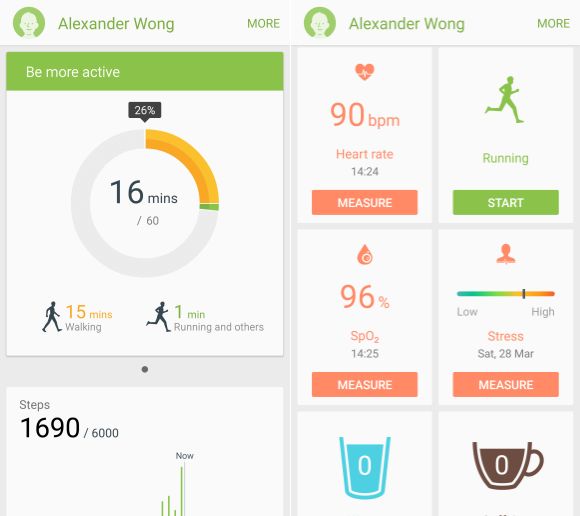
- It records data. I have used it to track:
- Calories - Calories in must be less than calories out to lose weight. The app allowed me to set a goal and showed me how I was doing throughout the day. I shot to stay under 2700 calories, attempting to have 3 meals of about 700 calories and a snack of 200 in between. Most nights though I opted for a larger dinner and no dessert.
- Activity - This includes both exercise related activities and a step counter. It combined the two to give me my active minutes. When I started my goal was 10,000 steps and 60 minutes of activity. Since then I have maintained my step goal but raised my activity goal to 140 minutes. Progress is a good thing.
- Side note - It will also track running, walking, and cycling distances with use of the GPS. Another cool feature and it will add ti to your active minutes.
- Calories burned - The activity monitored also gave me this info. Great for nights I knew I would splurge, so I could make sure to burn a few more in anticipation
The next app is Amazon. I know, sounds silly right. But I have saved tons on the protein powder (Raw Meal: Meal Replacement Shake) and the vitamins I am taking. If I bought these at a popular health food store, it would cost me $40 MORE A MONTH! Saving money makes it easier to splurge on things like this that help with the transition.

Music Apps: I have used iHeart Radio, Prime Music, and Pandora. It helps when you are trying to get things moving early in the morning or after a long day of work.

Even with the apps, you got to put in some work. These simply help. . . ALOT!
Tuesday, December 15, 2015
How My Phone Helped Me Lose 20 Pounds
First of all, let me say that carrying a phone in your pocket and checking in on social media is not going to shed the pounds. Although this would be easier, it just didn't work for me when I tried it. But let me give you a little insight on how I used my phone to shed some unwanted "daddy pounds".
I upgraded to the Samsung Note 4 while waiting in line to upgrade my wife's phone. Figured I would kill two birds with one stone. After playing around with the phone I started looking at S-health and some of its uses. Here is what I found, that was very easy to use:
Calorie tracker with pre-loaded items (a lot of them)
- Step tracker
- Exercise Tracker
- Activity Tracker (combines steps and exercise)
With these as my starting point I thought, "Let's put this to the test." I started with three goals. The first was to maintain a lower calorie count. I'm not a small guy so coming in at 2700 calories put me well below what I was using, thus creating the calorie deficit that is necessary for losing weight. Next I set a goal of 10,000 steps. If you are teaching, you do this while working with your students, no problem. then I set an activity goal. I set this at 100 minutes, which come to find out is very close to the 10,000 steps. This goal was repetitive until I bumped it up to include exercise, which included 3 hours of cardio per week.
After following this for 8 weeks I lost the 20 pounds. I will follow up with other details because there is so much more, but let me encourage you to try these simple tools if you are looking to slim down for the new year.
Subscribe to:
Posts (Atom)